Why does my countdown timer repeat after 60 seconds?
Every Instance of a Timer runs for 60 seconds
Whenever a timer is loaded, it loads an up-to-date version that runs for 60 seconds, and then repeats. If the email/timer is loaded again, a new version is loaded that runs for 60 seconds and then repeats.
The reason the timers repeat after 60 seconds is to ensure the timers load fast and that deliverability is not affected. GIFs that run for longer than 60 seconds do not load well in emails. This is also roughly the maximum time a user would read an email for without refreshing it anyway. If the email is refreshed, the timer will update to a new 60 second instance.
What if I do not want the timer to repeat?
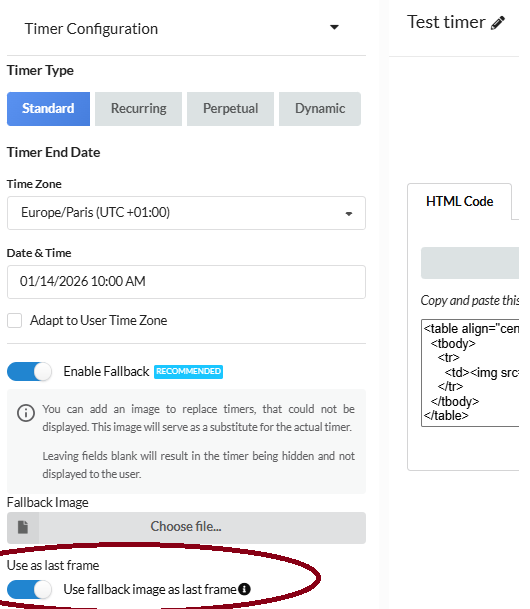
In case you do not want the timer to repeat after each instance has ran for 60 seconds, we have an option to display an image after the 60 seconds have passed. To enable this option, click edit on the timer you wish to apply this option to, toggle down the Timer Configuration tab on the left hand side, enable Fallback option, enable "Use fallback image as last frame", and upload the image which you would like to use as the timer has ran for 60 seconds.
When this option is enabled, the timer runs an up-to-date 60 seconds each time it is loaded and then shows the image uploaded.
Note: We will be separating the fallback image option and the "Use fallback image as last frame" options in the near future as they have different purposes.